How to continue from a previous alignment
This guide shows you how to start from an alignment that was uploaded earlier, to refine it or to compare it with another.
Steps
Open the session. Each shank starts from its most recent uploaded alignment, or from a recovered alignment if one was saved with Save Progress (see How to save work in progress and recover it).
To start from a different one, choose it from the alignment dropdown in the top right corner. The alignments are listed newest first, by the date and time they were made (and the user, when one is known), with
original(no alignment) last. The reference lines of the chosen alignment are drawn and the fit is applied straight away.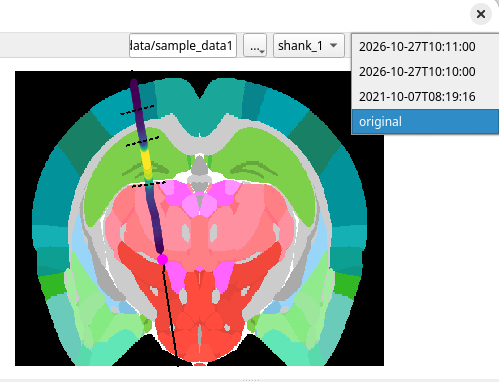
Move, add or remove reference lines and apply the fit as usual.
Upload. The new alignment is added to
prev_alignments.json; the earlier ones are kept.
With more than one shank, the dropdown applies to the active shank. Switch shanks first.