
 bpod-core
Data Format#
Data returned by get_data() is organized in tabular form as a
Polars DataFrame with the following columns:
Name |
Datatype |
Description |
|---|---|---|
|
absolute UTC timestamp, see section Timestamps below. |
|
|
zero-based trial index. |
|
|
state machine hash, see |
|
|
name of the current |
|
|
type of the current event. |
|
|
input event name; only for events of type |
|
|
name of the respective input or output channel. |
|
|
value of the channel. |
For the state machine in Listing 14 the returned
DataFrame could look like this:
>>> data
shape: (1_100, 8)
┌────────────────────────────────┬───────┬──────────────────┬───────┬─────────────────┬───────┬─────────┬───────┐
│ time                           ┆ trial ┆ state machine    ┆ state ┆ type            ┆ event ┆ channel ┆ value │
│ ---                            ┆ ---   ┆ ---              ┆ ---   ┆ ---             ┆ ---   ┆ ---     ┆ ---   │
│ datetime[μs, UTC]              ┆ u16   ┆ cat              ┆ cat   ┆ enum            ┆ cat   ┆ cat     ┆ u8    │
╞════════════════════════════════╪═══════╪══════════════════╪═══════╪═════════════════╪═══════╪═════════╪═══════╡
│ 2026-07-22 12:57:29.766633 UTC ┆ 0     ┆ 3725de06508951c9 ┆ null  ┆ TrialStart      ┆ null  ┆ null    ┆ null  │
│ 2026-07-22 12:57:29.766633 UTC ┆ 0     ┆ 3725de06508951c9 ┆ s1    ┆ StateStart      ┆ null  ┆ null    ┆ null  │
│ 2026-07-22 12:57:29.766633 UTC ┆ 0     ┆ 3725de06508951c9 ┆ s1    ┆ OutputAction    ┆ null  ┆ PWM1    ┆ 153   │
│ 2026-07-22 12:57:29.844833 UTC ┆ 0     ┆ 3725de06508951c9 ┆ s1    ┆ InputEvent      ┆ Tup   ┆ null    ┆ null  │
│ 2026-07-22 12:57:29.844833 UTC ┆ 0     ┆ 3725de06508951c9 ┆ s1    ┆ StateEnd        ┆ null  ┆ null    ┆ null  │
│ …                              ┆ …     ┆ …                ┆ …     ┆ …               ┆ …     ┆ …       ┆ …     │
│ 2026-07-22 12:57:45.100633 UTC ┆ 99    ┆ 855928477a81a140 ┆ s2    ┆ OutputAction    ┆ null  ┆ PWM1    ┆ 0     │
│ 2026-07-22 12:57:45.200633 UTC ┆ 99    ┆ 855928477a81a140 ┆ s2    ┆ InputEvent      ┆ Tup   ┆ null    ┆ null  │
│ 2026-07-22 12:57:45.200633 UTC ┆ 99    ┆ 855928477a81a140 ┆ s2    ┆ StateEnd        ┆ null  ┆ null    ┆ null  │
│ 2026-07-22 12:57:45.200733 UTC ┆ 99    ┆ 855928477a81a140 ┆ null  ┆ TrialEnd        ┆ null  ┆ null    ┆ null  │
│ 2026-07-22 12:57:45.200635 UTC ┆ 99    ┆ 855928477a81a140 ┆ null  ┆ TrialEndControl ┆ null  ┆ null    ┆ null  │
└────────────────────────────────┴───────┴──────────────────┴───────┴─────────────────┴───────┴─────────┴───────┘
Timestamps#
The data is stored using absolute UTC timestamps rather than relative ones. This avoids ambiguity when combining data across trials, state machines, or external data sources, preserves the original temporal ordering without requiring additional context, and provides a consistent time reference independent of the system’s local timezone.
Absolute time is computed from the Bpod’s hardware timer (microseconds since boot),
offset by the host computer’s system clock at instantiation of the
Bpod class. Because the two clocks are independent, they may
drift apart over time. You can call reset_session_clock()
outside of a state machine run to resynchronize them.
Displaying the timestamps in a different timezone is a one-liner:
>>> data.with_columns(pl.col("time").dt.convert_time_zone("Europe/Berlin"))
shape: (1_100, 8)
┌─────────────────────────────────┬───────┬──────────────────┬───────┬─────────────────┬───────┬─────────┬───────┐
│ time                            ┆ trial ┆ state machine    ┆ state ┆ type            ┆ event ┆ channel ┆ value │
│ ---                             ┆ ---   ┆ ---              ┆ ---   ┆ ---             ┆ ---   ┆ ---     ┆ ---   │
│ datetime[μs, Europe/Berlin]     ┆ u16   ┆ cat              ┆ cat   ┆ enum            ┆ cat   ┆ cat     ┆ u8    │
╞═════════════════════════════════╪═══════╪══════════════════╪═══════╪═════════════════╪═══════╪═════════╪═══════╡
│ 2026-07-22 14:57:29.766633 CES… ┆ 0     ┆ 3725de06508951c9 ┆ null  ┆ TrialStart      ┆ null  ┆ null    ┆ null  │
│ 2026-07-22 14:57:29.766633 CES… ┆ 0     ┆ 3725de06508951c9 ┆ s1    ┆ StateStart      ┆ null  ┆ null    ┆ null  │
│ 2026-07-22 14:57:29.766633 CES… ┆ 0     ┆ 3725de06508951c9 ┆ s1    ┆ OutputAction    ┆ null  ┆ PWM1    ┆ 153   │
│ 2026-07-22 14:57:29.844833 CES… ┆ 0     ┆ 3725de06508951c9 ┆ s1    ┆ InputEvent      ┆ Tup   ┆ null    ┆ null  │
│ 2026-07-22 14:57:29.844833 CES… ┆ 0     ┆ 3725de06508951c9 ┆ s1    ┆ StateEnd        ┆ null  ┆ null    ┆ null  │
│ …                               ┆ …     ┆ …                ┆ …     ┆ …               ┆ …     ┆ …       ┆ …     │
│ 2026-07-22 14:57:45.100633 CES… ┆ 99    ┆ 855928477a81a140 ┆ s2    ┆ OutputAction    ┆ null  ┆ PWM1    ┆ 0     │
│ 2026-07-22 14:57:45.200633 CES… ┆ 99    ┆ 855928477a81a140 ┆ s2    ┆ InputEvent      ┆ Tup   ┆ null    ┆ null  │
│ 2026-07-22 14:57:45.200633 CES… ┆ 99    ┆ 855928477a81a140 ┆ s2    ┆ StateEnd        ┆ null  ┆ null    ┆ null  │
│ 2026-07-22 14:57:45.200733 CES… ┆ 99    ┆ 855928477a81a140 ┆ null  ┆ TrialEnd        ┆ null  ┆ null    ┆ null  │
│ 2026-07-22 14:57:45.200635 CES… ┆ 99    ┆ 855928477a81a140 ┆ null  ┆ TrialEndControl ┆ null  ┆ null    ┆ null  │
└─────────────────────────────────┴───────┴──────────────────┴───────┴─────────────────┴───────┴─────────┴───────┘
Relative timestamps can be derived on demand by subtracting the first timestamp from the
time column. The unit of the time column is preserved during this operation, and
the result automatically takes on the Duration type:
>>> data.with_columns(pl.col("time") - pl.col("time").first())
shape: (1_100, 8)
┌──────────────┬───────┬──────────────────┬───────┬─────────────────┬───────┬─────────┬───────┐
│ time         ┆ trial ┆ state machine    ┆ state ┆ type            ┆ event ┆ channel ┆ value │
│ ---          ┆ ---   ┆ ---              ┆ ---   ┆ ---             ┆ ---   ┆ ---     ┆ ---   │
│ duration[μs] ┆ u16   ┆ cat              ┆ cat   ┆ enum            ┆ cat   ┆ cat     ┆ u8    │
╞══════════════╪═══════╪══════════════════╪═══════╪═════════════════╪═══════╪═════════╪═══════╡
│ 0µs          ┆ 0     ┆ 3725de06508951c9 ┆ null  ┆ TrialStart      ┆ null  ┆ null    ┆ null  │
│ 0µs          ┆ 0     ┆ 3725de06508951c9 ┆ s1    ┆ StateStart      ┆ null  ┆ null    ┆ null  │
│ 0µs          ┆ 0     ┆ 3725de06508951c9 ┆ s1    ┆ OutputAction    ┆ null  ┆ PWM1    ┆ 153   │
│ 78200µs      ┆ 0     ┆ 3725de06508951c9 ┆ s1    ┆ InputEvent      ┆ Tup   ┆ null    ┆ null  │
│ 78200µs      ┆ 0     ┆ 3725de06508951c9 ┆ s1    ┆ StateEnd        ┆ null  ┆ null    ┆ null  │
│ …            ┆ …     ┆ …                ┆ …     ┆ …               ┆ …     ┆ …       ┆ …     │
│ 15s 334ms    ┆ 99    ┆ 855928477a81a140 ┆ s2    ┆ OutputAction    ┆ null  ┆ PWM1    ┆ 0     │
│ 15s 434ms    ┆ 99    ┆ 855928477a81a140 ┆ s2    ┆ InputEvent      ┆ Tup   ┆ null    ┆ null  │
│ 15s 434ms    ┆ 99    ┆ 855928477a81a140 ┆ s2    ┆ StateEnd        ┆ null  ┆ null    ┆ null  │
│ 15s 434100µs ┆ 99    ┆ 855928477a81a140 ┆ null  ┆ TrialEnd        ┆ null  ┆ null    ┆ null  │
│ 15s 434002µs ┆ 99    ┆ 855928477a81a140 ┆ null  ┆ TrialEndControl ┆ null  ┆ null    ┆ null  │
└──────────────┴───────┴──────────────────┴───────┴─────────────────┴───────┴─────────┴───────┘
Filtering#
The different columns are designed to facilitate filtering the data. If, for instance,
you wanted to look at all events that affect the output channel PWM1, you could
filter the table like so:
>>> import polars as pl
>>> data.filter(pl.col("channel") == "PWM1")
shape: (200, 8)
┌────────────────────────────────┬───────┬──────────────────┬───────┬──────────────┬───────┬─────────┬───────┐
│ time                           ┆ trial ┆ state machine    ┆ state ┆ type         ┆ event ┆ channel ┆ value │
│ ---                            ┆ ---   ┆ ---              ┆ ---   ┆ ---          ┆ ---   ┆ ---     ┆ ---   │
│ datetime[μs, UTC]              ┆ u16   ┆ cat              ┆ cat   ┆ enum         ┆ cat   ┆ cat     ┆ u8    │
╞════════════════════════════════╪═══════╪══════════════════╪═══════╪══════════════╪═══════╪═════════╪═══════╡
│ 2026-07-22 12:57:29.766633 UTC ┆ 0     ┆ 3725de06508951c9 ┆ s1    ┆ OutputAction ┆ null  ┆ PWM1    ┆ 153   │
│ 2026-07-22 12:57:29.844833 UTC ┆ 0     ┆ 3725de06508951c9 ┆ s2    ┆ OutputAction ┆ null  ┆ PWM1    ┆ 0     │
│ 2026-07-22 12:57:29.944933 UTC ┆ 1     ┆ cd97a8704d870e0b ┆ s1    ┆ OutputAction ┆ null  ┆ PWM1    ┆ 232   │
│ 2026-07-22 12:57:29.971433 UTC ┆ 1     ┆ cd97a8704d870e0b ┆ s2    ┆ OutputAction ┆ null  ┆ PWM1    ┆ 0     │
│ 2026-07-22 12:57:30.071533 UTC ┆ 2     ┆ 0c1f231425c8a2eb ┆ s1    ┆ OutputAction ┆ null  ┆ PWM1    ┆ 246   │
│ …                              ┆ …     ┆ …                ┆ …     ┆ …            ┆ …     ┆ …       ┆ …     │
│ 2026-07-22 12:57:44.717333 UTC ┆ 97    ┆ add60bcbf67382be ┆ s2    ┆ OutputAction ┆ null  ┆ PWM1    ┆ 0     │
│ 2026-07-22 12:57:44.817433 UTC ┆ 98    ┆ 09da4c4059dd89cb ┆ s1    ┆ OutputAction ┆ null  ┆ PWM1    ┆ 133   │
│ 2026-07-22 12:57:44.908433 UTC ┆ 98    ┆ 09da4c4059dd89cb ┆ s2    ┆ OutputAction ┆ null  ┆ PWM1    ┆ 0     │
│ 2026-07-22 12:57:45.008533 UTC ┆ 99    ┆ 855928477a81a140 ┆ s1    ┆ OutputAction ┆ null  ┆ PWM1    ┆ 244   │
│ 2026-07-22 12:57:45.100633 UTC ┆ 99    ┆ 855928477a81a140 ┆ s2    ┆ OutputAction ┆ null  ┆ PWM1    ┆ 0     │
└────────────────────────────────┴───────┴──────────────────┴───────┴──────────────┴───────┴─────────┴───────┘
Plotting#
Filtering makes it straightforward to extract data for plotting. We use data returned
by the state machines in Listing 14 to produce a stairstep graph of the
PWM1 output channel over relative time:
import matplotlib.pyplot as plt
import polars as pl

# filter data to values of the 'PWM1' channel across the first 10 trials
filtered = data.filter(
    (pl.col("channel") == "PWM1") &
    (pl.col("trial") <= 10)
)

# extract two columns, relative 'time' and 'value'
x = filtered['time'] - filtered['time'].first()
y = filtered['value']

# matplotlib doesn't play nice with timedelta values, so we convert them to float
x = x.dt.total_seconds(fractional=True)

# plot
plt.step(x, y, where='post')
plt.xlabel('Time (s)')
plt.ylabel('PWM Value')
plt.show()
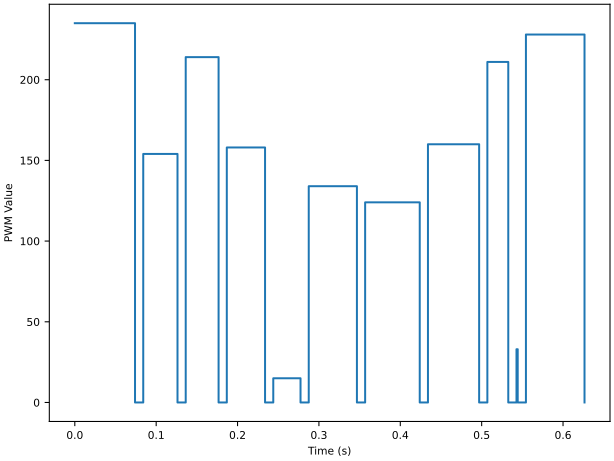
Fig. 15 Visualising values of the PWM1 channel across 10 trials.#
See also
See the Polars documentation for details about the support for various visualization libraries.
Storing Data#
Because most of the columns consist of Categorical data,
data can be very efficiently written to disk as a Parquet
file using write_parquet():
data.write_parquet('data.pqt')
If you prefer Comma-Separated Values (CSV)—for example, to inspect the data in a
spreadsheet editor such as Excel—use the write_csv() method
instead:
data.write_csv('data.csv')
Note that CSV files are typically about an order of magnitude larger than their Parquet equivalents.
Pandas#
If you prefer Pandas over
Polars, you can easily convert the data to a
pandas.DataFrame using the built-in to_pandas() method:
>>> data.to_pandas()
                                 time  trial     state machine state             type event channel  value
0    2026-07-22 12:57:29.766633+00:00      0  3725de06508951c9   NaN       TrialStart   NaN     NaN    NaN
1    2026-07-22 12:57:29.766633+00:00      0  3725de06508951c9    s1       StateStart   NaN     NaN    NaN
2    2026-07-22 12:57:29.766633+00:00      0  3725de06508951c9    s1     OutputAction   NaN    PWM1  153.0
3    2026-07-22 12:57:29.844833+00:00      0  3725de06508951c9    s1       InputEvent   Tup     NaN    NaN
4    2026-07-22 12:57:29.844833+00:00      0  3725de06508951c9    s1         StateEnd   NaN     NaN    NaN
...                               ...    ...               ...   ...              ...   ...     ...    ...
1095 2026-07-22 12:57:45.100633+00:00     99  855928477a81a140    s2     OutputAction   NaN    PWM1    0.0
1096 2026-07-22 12:57:45.200633+00:00     99  855928477a81a140    s2       InputEvent   Tup     NaN    NaN
1097 2026-07-22 12:57:45.200633+00:00     99  855928477a81a140    s2         StateEnd   NaN     NaN    NaN
1098 2026-07-22 12:57:45.200733+00:00     99  855928477a81a140   NaN         TrialEnd   NaN     NaN    NaN
1099 2026-07-22 12:57:45.200635+00:00     99  855928477a81a140   NaN  TrialEndControl   NaN     NaN    NaN

[1100 rows x 8 columns]
More on Polars#
The examples above only cover a small subset of what is possible with Polars. You can use the full expression system to filter, transform, aggregate, and analyze the data efficiently, even for large datasets. For a comprehensive overview of available operations and patterns, refer to the Polars documentation.