
 bpod-core
Using the Bpod Class#
The Bpod class is bpod-core’s entry point for communicating
with a Bpod device. It opens a serial connection, sends compiled state machines to
the hardware, controls execution, and returns trial data.
Connecting to a Device#
Bpod can connect to a device by port, serial_number,
or — when both are omitted — by auto-discovering the first available Bpod on the system.
In most use cases it’s best to use the class as a context manager: it guarantees the
serial connection is closed and any running trial is allowed to finish on exit.
1from bpod_core.bpod import Bpod
2
3with Bpod('/dev/ttyACM0') as bpod:
4    pass  # do things
Tip
Serial port names such as /dev/ttyACM0 are assigned by the OS and may change
across reboots; the serial number, however, is a stable hardware identifier.
If you do not know your device’s serial number yet, connect once (auto-discover or
by port) and read serial_number off the object.
Then use it in all subsequent scripts for a stable, reboot-proof connection:
>>> with Bpod() as bpod:
...     bpod.serial_number
'14260000'

>>> with Bpod(serial_number='14260000') as bpod:
...     pass  # do things ...
Running State Machines#
To run a state machine on a Bpod device, use the run() method
of your Bpod instance. It validates and compiles the state
machine, and finally enqueues it on the Bpod for immediate execution.
Calling get_data() after a state machine run returns the
collected data as a Polars DataFrame (see Data Format).
 1from bpod_core.bpod import Bpod
 2from bpod_core.fsm import StateMachine
 3
 4# define a state machine
 5fsm = StateMachine()
 6fsm.add_state('Wait', transitions={'Port1_High': 'LightPort1', 'Port2_High': 'LightPort2'})
 7fsm.add_state('LightPort1', timer=1, transitions={'Tup': '>exit'}, actions={'PWM1': 255})
 8fsm.add_state('LightPort2', timer=1, transitions={'Tup': '>exit'}, actions={'PWM2': 255})
 9
10# run the state machine
11with Bpod() as bpod:
12    bpod.run(fsm)
13
14# collect the data
15data = bpod.get_data()
Note
In the example above, get_data() is called outside the
context manager. The connection is already closed at that point, but the data queue
persists on the Bpod object and is safe to drain after the
context exits.
See also
Refer to Finite-State Machines for the full reference of the
StateMachine object.
Zero-Downtime Execution#
You can invoke run() several times in quick succession. Each
call automatically blocks until the hardware is ready to accept the next state machine.
The Bpod starts executing the transferred state machine as soon as possible—either right
away if no trial is running, or as soon as the preceding trial ends—enabling
back-to-back execution of state machines with zero inter-trial downtime and continuous
acquisition.
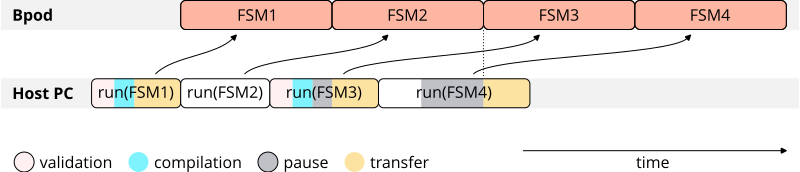
When calling get_data(), data from individual trials is
automatically concatenated to a continuous Polars DataFrame. In the
following example, a single state machine is executed 100 times:
1from bpod_core.bpod import Bpod
2from bpod_core.fsm import StateMachine
3
4with Bpod() as bpod:
5    for trial in range(100):
6        bpod.run(fsm)
7
8data = bpod.get_data()
On-The-Fly Definition#
Similarly, you can define state machines on-the-fly within the loop. The
run() method is non-blocking (unless the Bpod is not
yet ready to accept a transfer) and the individual state machines will run continuously,
as long as preparing and uploading a state machine’s successor takes less time than the
current state machine takes to execute.
StateMachine objects are mutable: state timers, actions, and
transitions can all be reassigned between trials without rebuilding the full state
machine from scratch. In the following example we construct an initial
StateMachine instance that we continue to modify from trial to
trial, yielding randomized state timers and action values:
 1from random import random, randint
 2
 3from bpod_core.fsm import StateMachine
 4from bpod_core.bpod import Bpod
 5
 6fsm = StateMachine()
 7fsm.add_state('s1', transitions={'Tup': 's2'})
 8fsm.add_state('s2', timer=0.1, transitions={'Tup': '>exit'})
 9
10with Bpod() as bpod:
11    for trial in range(100):
12        fsm.states['s1'].timer = random() / 10
13        fsm.states['s1'].actions['PWM1'] = randint(0, 255)
14        bpod.run(fsm)
15
16data = bpod.get_data()
Retrieval of Partial Data#
peek_data() retrieves data from a running state machine
without waiting for it to finish. It blocks until one of the specified
trigger_states is reached, then returns a copy of all data collected up to that
point.
The example below uses two state machines per trial: the first measures the duration of
an event on Port0; the second plays back an output of that same duration on
PWM0. After starting fsm1, peek_data() blocks until
the pause state is reached, extracts the timing, and uses it to configure fsm2
before queuing it—with no idle time between the two runs. The final
get_data() call collects data across all trials.
 1import polars as pl
 2
 3from bpod_core.fsm import StateMachine
 4from bpod_core.bpod import Bpod
 5
 6# construct first state machine (identical across all trials)
 7fsm1 = StateMachine()
 8fsm1.add_state('wait', transitions={'Port0_High': 'measure'})
 9fsm1.add_state('measure', transitions={'Port0_Low': 'pause'})
10fsm1.add_state('pause', timer=0.5, transitions={'Tup': '>exit'})
11
12# construct second state machine (will be modified within each trial)
13fsm2 = StateMachine()
14fsm2.add_state('echo', transitions={'Tup': '>exit'}, actions={'PWM0': 255})
15
16with Bpod() as bpod:
17    for i in range(10):
18        # run first state machine
19        bpod.run(fsm1, trial_number=i)
20
21        # peek at data once 'pause' state has been reached
22        runtime_data = bpod.peek_data(trigger_states=['pause'])
23
24        # calculate duration of 'Port0_High'
25        d = runtime_data.filter(pl.col("channel") == "Port0")['time'].diff().last()
26
27        # set state timer and run second state machine
28        fsm2.states['echo'].timer = d
29        bpod.run(fsm2, trial_number=i)
30
31data = bpod.get_data()  # collect data across all state machine runs
Note
The trial number is normally incremented automatically with each call to
run(). Here, two state machines share a single
trial, so trial_number is set explicitly to keep it aligned with the loop index.