How to access the IBL Brain-Wide Map LFP dataset

The IBL Brain-Wide Map (BWM) LFP dataset is distributed as a 16GB .h5 file containing 699 individual recordings of 384 channels each.

WarningKnown Dataset limitations
  • Saturation events — ADC-clipped stretches are flagged and muted in the decompressed output; check whether your window of interest overlaps one before trusting amplitude. See Quality Control - Saturation.
  • Missing sync for 7 probest0_sync/fs_sync could not be computed for 7 probes (spanning 4 sessions) due to a session-level sync data-quality issue upstream; sr.t0 returns NaN for these. See lfpack#8.
  • High-frequency roll-off — the SVD + wavelet-packet codec trades off power above roughly 20-30 Hz for compression ratio, more so at the aggressive tier. See the PSD comparison below.
  • Low-frequency channel-to-channel mismatch — per-channel impedance/analog-filter differences show up as amplitude outliers at low frequencies (below 1.5 Hz) and are not fully corrected by the current pre-processing pipeline.

Average PSD across compression tiers for a representative recording — high frequencies are increasingly attenuated as compression ratio (CR) rises from cadzow-only to default (119×) to aggressive (254×).

Average PSD across compression tiers for a representative recording — high frequencies are increasingly attenuated as compression ratio (CR) rises from cadzow-only to default (119×) to aggressive (254×).
ImportantBefore you start
  • Align with trial events via sr.times — each recording stores a sync-corrected session clock; always use sr.times rather than a manual np.arange / sr.fs when matching LFP samples to spike times or trial events. See Session-clock times.

  • Use binned reads for brainwide sweeps — looping over all 699 recordings at full 384-channel resolution is memory-intensive. Pass bin_channels=4 to reduce each recording to 96 spatial bins with acceptable loss of depth coverage. See Binned-channel reads.

Visualise with viewephys

viewephys has a native lfpack backend — point it at the .h5 file directly, no manual transpose or BrainRegions wiring needed:

viewephys -f lf_compressed_all_bwm.h5

The .h5 extension is auto-detected and opens the lfpack-aware viewer, which:

  • shows a searchable recording selector (type any pid substring) when the file holds multiple recordings, preserving window size, position and zoom when you switch
  • colours the depth axis by brain region automatically, reading the atlas_id / acronym annotations embedded in the file — no separate iblatlas call required
  • adds a CSD (current-source density) step alongside the raw signal

Ephys Bin Viewer window showing the searchable recording dropdown and raw/CSD checkboxes for an lfpack HDF5 file

Recording selector (top right) and raw/CSD checkboxes after opening a multi-recording lfpack file — the dataset info panel confirms the native “Neuropixels LFP (lfpack)” backend

The same class is usable from Python:

from viewephys.gui import LFPackBinViewer
from viewephys.viewer.qt import create_app

app = create_app()
win = LFPackBinViewer("lf_compressed_all_bwm.h5")
app.exec()

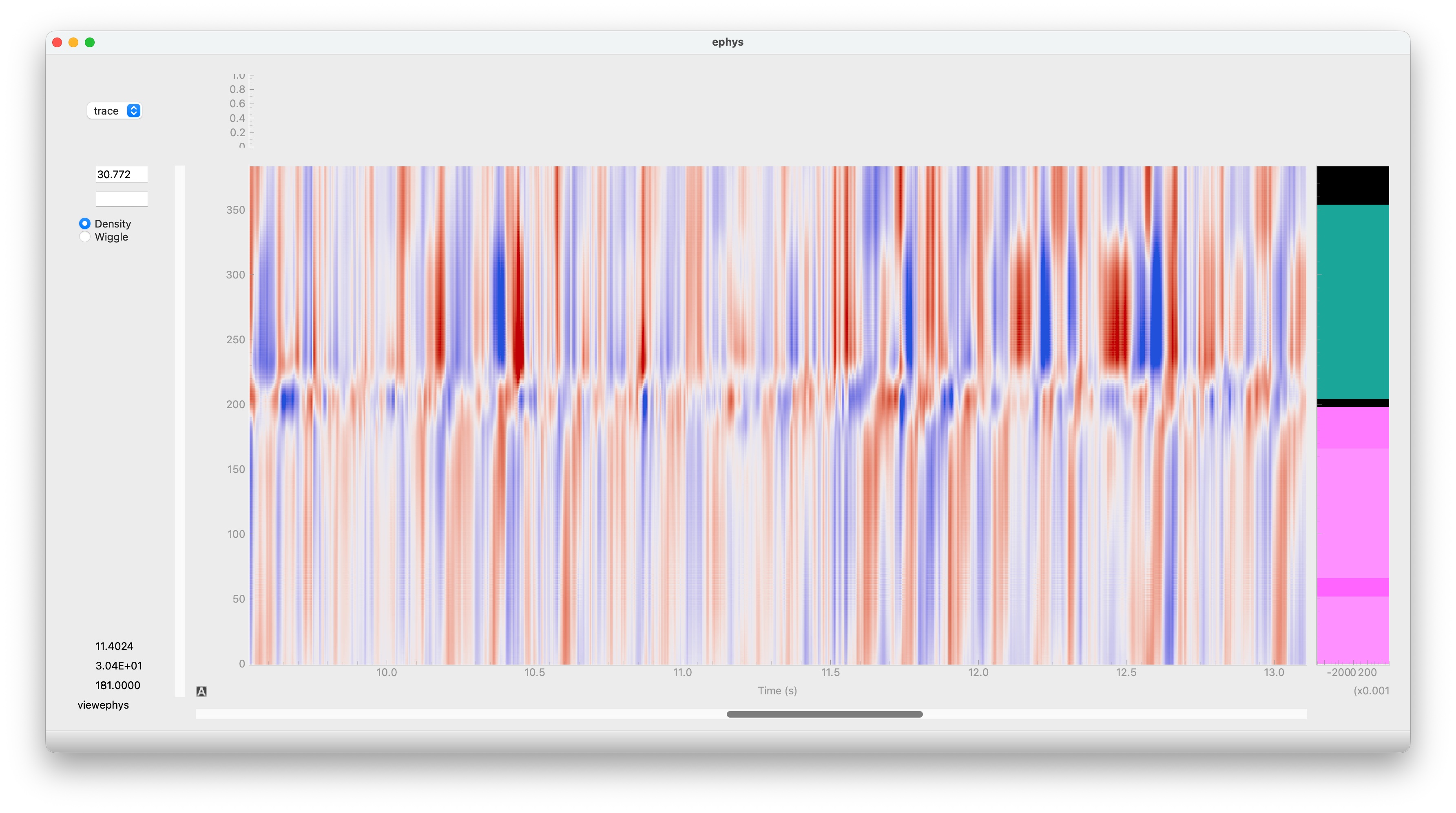
viewephys density view showing 384-channel LFP data with brain region colour bar and a searchable recording selector

viewephys opened directly on a BWM lfpack file — brain regions colour the depth axis automatically and the searchable selector switches between the file’s 699 recordings

See viewephys PR #49 for implementation details.

Prerequisites

uv pip install "viewephys[lfpack]" one-api

Download

From inside the ibl-ai-agent repository:

uv run python scripts/download_datasets.py --lfp

This downloads lf_compressed_all_bwm.h5 (~14 GB) into reports/datasets/bwm_lfp/ and writes the path into data_locations.local.yaml automatically.

Or, from Python (no AWS credentials needed — uses the ONE public S3 helper):

from one.remote.aws import s3_download_file

s3_download_file(
    source="resources/ibl-agent-data/lf_compressed_all_bwm.h5",
    destination="lf_compressed_all_bwm.h5",
)

s3_download_file defaults to the IBL public bucket, shows a tqdm progress bar, and skips the download if the local file already has the correct size.

Session-clock times

sr.times returns a (ns,) array of session-clock timestamps (seconds) for every LFP sample, derived from the sync signal stored during compression. Use it to align LFP traces with trial events or spike times:

from lfpack import LFPackReader
import numpy as np

file_lfpack = "lf_compressed_all_bwm.h5"
pid = 'dab512bd-a02d-4c1f-8dbc-9155a163efc0'

sr = LFPackReader(file_lfpack, recording=pid)

n = int(10 * sr.fs)
traces = sr[:n, :]      # (n_samples, nc) — first 10 s
t = sr.times[:n]        # (n_samples,)    — session-clock seconds

# Align with trial events loaded via ONE
# stim_on = trials['stimOn_times']   # already in session-clock seconds
# idx = np.searchsorted(t, stim_on)  # nearest LFP sample for each stimulus onset

List recordings

Each file contains one entry per BWM probe. Recording identifiers are named after the probe identifier UUID pid.

from lfpack import LFPackReader

recordings = LFPackReader.recordings("lf_compressed_all_bwm.h5")
print(f"{len(recordings)} recordings")
print(recordings[:3])
# 699 recordings
# ['00a824c0-e060-495f-9ebc-79c82fef4c67', '00a96dee-1e8b-44cc-9cc3-aca704d2b594', '00c425fd-ec3e-4cd2-b8af-c0bc0c4bdd44']

Read a single recording

from lfpack import LFPackReader

file_lfpack = "lf_compressed_all_bwm.h5"
pid = 'dab512bd-a02d-4c1f-8dbc-9155a163efc0'

sr = LFPackReader(file_lfpack, recording=pid)

# First 10 seconds — shape (2500, nc), float32, volts
traces = sr[: int(10 * sr.fs)].T

print(f"Duration:    {sr.ns / sr.fs:.1f} s")
print(f"Channels:    {sr.nc}")
print(f"Sample rate: {sr.fs} Hz")   # 250 Hz (decimated from 2500 Hz)
print(f"Shape:       {traces.shape}")

# Duration:    3668.9 s
# Channels:    384
# Sample rate: 250.00252518761928 Hz
# Shape:       (384, 2500)

LFPackReader is a drop-in for spikeglx.Reader. Slicing decompresses only the requested chunks — the full file is never loaded into memory.

Quality Control - Saturation

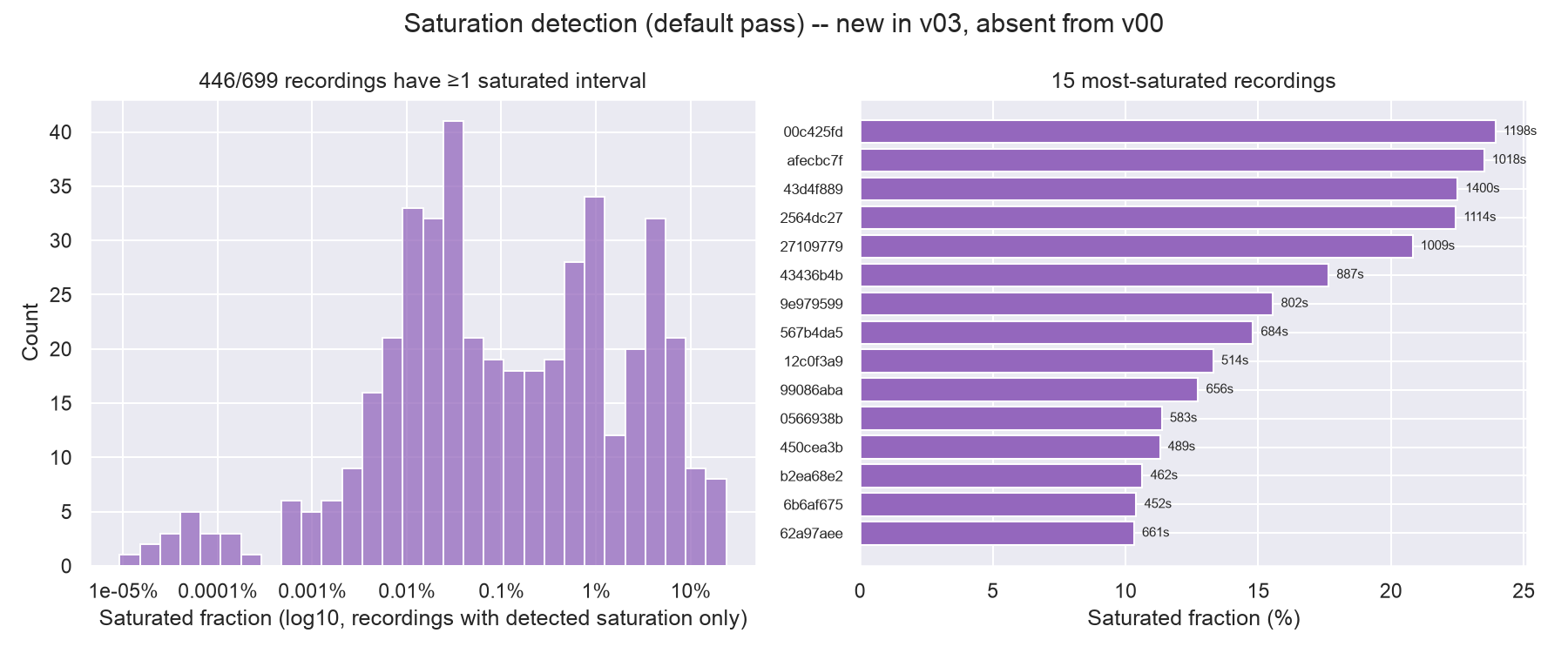
Each recording carries an insertion-level table of ADC-saturated (clipped) spans, detected on the raw LFP band before any filtering. The saturated stretches are muted (zeroed) in the decompressed output, so it’s worth checking whether a window of interest overlaps one before trusting the amplitude.

from lfpack import LFPackReader

sr = LFPackReader("lf_compressed_all_bwm.h5", recording=pid)

# Interval table: raw-rate sample indices, recording-aligned
sr.saturation
#    start_sample  stop_sample
# 0        123456       125000

# Recording-level summary (fraction/count/whether muting was applied)
sr.saturation_summary
# {'saturated_fraction': 0.0052, 'n_intervals': 3, 'total_saturated_sec': 12.9, 'muted': True, ...}

saturation_mask gives a boolean array at the reader’s own — decimated — sampling rate, indexed exactly like the reader itself rather than called with a window:

n = int(10 * sr.fs)
traces = sr[:n, :]                  # (n, nc)
mask = sr.saturation_mask[:n]       # (n,) bool, True where saturated

traces_clean = traces[~mask]

For session-clock timestamps of saturated intervals (e.g. to overlay against trial events), use saturation_times rather than converting sr.saturation’s samples to seconds by hand — it applies the same sync correction as sr.times:

sr.saturation_times()
#    start_sample  stop_sample  start_time  stop_time
# 0        123456       125000    1234.382    1235.000

All four (saturation, saturation_summary, saturation_mask, saturation_times) degrade gracefully to empty/default values on recordings without saturation detection, so the same code works across the whole dataset without a try/except.

Saturation detection across the 699-recording release: per-recording saturated-fraction distribution (left) and the 15 most-affected recordings (right).

Saturation detection across the 699-recording release: per-recording saturated-fraction distribution (left) and the 15 most-affected recordings (right).

Channel brain locations

Each recording stores per-channel brain location annotations embedded in the file — no network call needed. Access them via sr.channels:

from lfpack import LFPackReader

sr = LFPackReader("lf_compressed_all_bwm.h5", recording=pid)
ch = sr.channels

print(ch["acronym"][:5])   # ['VISp', 'VISp', 'CA1', 'CA1', 'DG']
print(ch["atlas_id"][:5])  # Allen CCF structure IDs, int32
print(ch["x"][:5])         # mediolateral MNI coordinates, metres
print(ch["y"][:5])         # anteroposterior
print(ch["z"][:5])         # dorsoventral

When using bin_channels, channels automatically aggregates: coordinates are averaged and brain region is the within-group mode:

sr = LFPackReader("lf_compressed_all_bwm.h5", recording=pid, bin_channels=4)
ch = sr.channels           # shapes (96,) — one entry per spatial bin
ch_full = sr.channels_full # shapes (384,) — always raw per-electrode

Binned-channel reads

Adjacent channels are spatially correlated at LFP frequencies. Passing bin_channels sums neighbouring channels during decompression, reducing memory use. A factor of 4 takes 384 channels down to 96 while keeping depth resolution useful for LFP.

from lfpack import LFPackReader

file_lfpack = "lf_compressed_all_bwm.h5"
pid = 'dab512bd-a02d-4c1f-8dbc-9155a163efc0'

sr = LFPackReader(file_lfpack, recording=pid, bin_channels=4)

traces = sr[:, :]      # (ns, 96) — full recording, 96 spatial bins
print(sr.nc)           # 96
print(sr.geometry["y"])           # mean depth of each 4-channel group
print(sr.geometry_full['binned_channel_index'])  # spatial mapping of the original 384 channels into the 96 binned ones

Side-by-side LFP density plots at full and 4x binned channel resolution

Full-resolution (384 ch) vs binned ×4 (96 ch) LFP density for the same 4-second window