Exploring the public IBL data with ONE
This tutorial will give an introduction into the publicly available data and show how to download electrophysiology data for a probe insertion and display a simple raster plot
First let’s get started by importing the ONE module and connecting to the database
[7]:
# Import one and connect to the database
from one.api import ONE
one = ONE(base_url='https://openalyx.internationalbrainlab.org', silent=True)
We want to see what probe insertions are available on the database. To list them we can use the following command
[8]:
eid = one.search()[0]
probe_insertions = one.load_dataset(eid, 'probes.description')
We can find the number of probes insertions available and some information about the first probe
[9]:
from pprint import pprint
print(f'N probes = {len(probe_insertions)}')
pprint(probe_insertions[0])
N probes = 2
{'label': 'probe00',
 'model': '3B2',
 'raw_file_name': 'D:/iblrig_data/Subjects/SWC_043/2020-09-21/001/raw_ephys_data/_spikeglx_ephysData_g0/_spikeglx_ephysData_g0_imec0/_spikeglx_ephysData_g0_t0.imec0.ap.bin',
 'serial': 19108320031}
Datasets associated with each probe insertion are contained within a collection named ‘alf/’, where is the probe insertion label.
[10]:
probe = probe_insertions[0]['label']

datasets = one.list_datasets(eid, collection=f'*/{probe}')
print(f'N datasets = {len(datasets)}')
pprint(datasets[0])
N datasets = 44
'alf/probe00/_kilosort_whitening.matrix.npy'
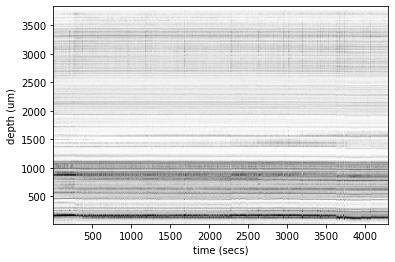
We are interested in downloading the spikes datasets output from spike sorting in order to display a raster plot of the neural activity recorded on the probe. To download the data we can use the following approach
[11]:
spikes = one.load_object(eid, 'spikes',
                         collection=f'alf/{probe}', attribute=['times', 'depths', 'amps'])
We can import a module from brainbox that plots the raster across time
Note.
Requires ibllib to be installed.
[12]:
from brainbox.plot import driftmap
driftmap(spikes['times'], spikes['depths'], t_bin=0.1, d_bin=5);