
 bpod-core
FlexIO Channels#
Bpod State Machine r2+ devices
expose a bank of four FlexIO channels, Flex1 to Flex4: general-purpose I/O
pins that can each be independently configured as a digital input, digital output,
analog input, or analog output.
Setting Up the Channels#
You choose a channel's identity through Bpod's
flex_io attribute, before running the first state machine:
from bpod_core.bpod import Bpod
from bpod_core.bpod.constants import FlexIOChannelType

with Bpod() as bpod:
    bpod.flex_io['Flex1'].channel_type = FlexIOChannelType.DIGITAL_INPUT
Channels you don't set up stay off. Once the first state machine has run, the channels
keep their identities until you close the connection to the Bpod. A channel's identity
also decides which input_event_names and
action_names it adds to your state machines (see
Finite-State Machines).
Known Firmware Issues
The current Bpod firmware has a few issues with FlexIO channels. Fixes exist, but they aren't part of an official firmware release yet:
Every state change switches FlexIO outputs to the new state's value, even while a global timer controls them (fix: #6).
A state that doesn't use
AnalogThreshEnableorAnalogThreshDisablecan still enable or disable thresholds, if a state at the same position in an earlier state machine did. This lasts until the Bpod is switched off (fix: #7).A digital input that is already on when a trial starts reports a
Flex{N}_Highevent at the start of the trial (fix: #12).Threshold events are only reliable for analog inputs on
Flex1,Flex2, and so on, with no channel of another identity before them, so bpod-core refuses thresholds on other channels (fixed in the firmware's development version: 6ea104b).
Digital Outputs#
A FlexIO channel configured as digital output is controlled with the Flex{N} action:
a value of 1 switches it on (5 V), and 0 switches it off. As with the Bpod's other
outputs, any state that doesn't set the output switches it off, so a short state makes a
short pulse.
In this example, a camera that takes a picture for each trigger pulse is connected to
Flex1, which is set up as a digital output. A 10 ms pulse makes the camera take a
picture, right before port 1 lights up:

Fig. 15 A 10 ms trigger pulse, followed by the port light.#

Fig. 16 A 10 ms trigger pulse, followed by the port light.#
 1from bpod_core.bpod import Bpod
 2from bpod_core.bpod.constants import FlexIOChannelType
 3from bpod_core.fsm import StateMachine
 4
 5fsm = StateMachine()
 6fsm.add_state(
 7    name='TriggerCamera',
 8    timer=0.01,
 9    transitions={'Tup': 'LightOn'},
10    actions={'Flex1': 1},
11)
12fsm.add_state(
13    name='LightOn',
14    timer=1,
15    transitions={'Tup': '>exit'},
16    actions={'PWM1': 255},
17)
18
19with Bpod() as bpod:
20    bpod.flex_io['Flex1'].channel_type = FlexIOChannelType.DIGITAL_OUTPUT
21    bpod.run(fsm)
22
23data = bpod.get_data()
Trial data of the camera-trigger example
>>> data
shape: (13, 8)
┌────────────────────────────────┬───────┬──────────────────┬───────────────┬─────────────────┬───────┬─────────┬───────┐
│ Time                           ┆ Trial ┆ State Machine    ┆ State         ┆ Type            ┆ Event ┆ Channel ┆ Value │
│ ---                            ┆ ---   ┆ ---              ┆ ---           ┆ ---             ┆ ---   ┆ ---     ┆ ---   │
│ datetime[μs, UTC]              ┆ u32   ┆ cat              ┆ cat           ┆ enum            ┆ cat   ┆ cat     ┆ u16   │
╞════════════════════════════════╪═══════╪══════════════════╪═══════════════╪═════════════════╪═══════╪═════════╪═══════╡
│ 2026-10-22 15:12:38.348493 UTC ┆ 0     ┆ 86d5ab27f2ecd65d ┆ null          ┆ TrialStart      ┆ null  ┆ null    ┆ null  │
│ 2026-10-22 15:12:38.348493 UTC ┆ 0     ┆ 86d5ab27f2ecd65d ┆ TriggerCamera ┆ StateStart      ┆ null  ┆ null    ┆ null  │
│ 2026-10-22 15:12:38.348493 UTC ┆ 0     ┆ 86d5ab27f2ecd65d ┆ TriggerCamera ┆ OutputAction    ┆ null  ┆ Flex1   ┆ 1     │
│ 2026-10-22 15:12:38.358493 UTC ┆ 0     ┆ 86d5ab27f2ecd65d ┆ TriggerCamera ┆ InputEvent      ┆ Tup   ┆ null    ┆ null  │
│ 2026-10-22 15:12:38.358493 UTC ┆ 0     ┆ 86d5ab27f2ecd65d ┆ TriggerCamera ┆ StateEnd        ┆ null  ┆ null    ┆ null  │
│ 2026-10-22 15:12:38.358493 UTC ┆ 0     ┆ 86d5ab27f2ecd65d ┆ LightOn       ┆ StateStart      ┆ null  ┆ null    ┆ null  │
│ 2026-10-22 15:12:38.358493 UTC ┆ 0     ┆ 86d5ab27f2ecd65d ┆ LightOn       ┆ OutputAction    ┆ null  ┆ Flex1   ┆ 0     │
│ 2026-10-22 15:12:38.358493 UTC ┆ 0     ┆ 86d5ab27f2ecd65d ┆ LightOn       ┆ OutputAction    ┆ null  ┆ PWM1    ┆ 255   │
│ 2026-10-22 15:12:39.358493 UTC ┆ 0     ┆ 86d5ab27f2ecd65d ┆ LightOn       ┆ InputEvent      ┆ Tup   ┆ null    ┆ null  │
│ 2026-10-22 15:12:39.358493 UTC ┆ 0     ┆ 86d5ab27f2ecd65d ┆ LightOn       ┆ StateEnd        ┆ null  ┆ null    ┆ null  │
│ 2026-10-22 15:12:39.358493 UTC ┆ 0     ┆ 86d5ab27f2ecd65d ┆ null          ┆ OutputAction    ┆ null  ┆ PWM1    ┆ 0     │
│ 2026-10-22 15:12:39.358493 UTC ┆ 0     ┆ 86d5ab27f2ecd65d ┆ null          ┆ TrialEnd        ┆ null  ┆ null    ┆ null  │
│ 2026-10-22 15:12:39.358495 UTC ┆ 0     ┆ 86d5ab27f2ecd65d ┆ null          ┆ TrialEndControl ┆ null  ┆ null    ┆ null  │
└────────────────────────────────┴───────┴──────────────────┴───────────────┴─────────────────┴───────┴─────────┴───────┘
The pulse shows up as two output actions on Flex1: on when TriggerCamera begins,
and off ten milliseconds later, when the next state begins and doesn't set it. See
Data Format for a description of all columns.
Digital Inputs#
A FlexIO channel configured as digital input reports an event whenever its signal
changes: Flex{N}_High when it turns on, Flex{N}_Low when it turns off. Like any
other event, these can move your state machine to another state, and they are recorded
in the trial data.
In this example, a beam-break sensor is connected to Flex1, which is set up as a
digital input. The state machine waits up to 10 seconds for the subject to break the
light beam, and then lights up port 1 for a second:

Fig. 17 A beam break on Flex1 leads to the LightOn state.#

Fig. 18 A beam break on Flex1 leads to the LightOn state.#
 1from bpod_core.bpod import Bpod
 2from bpod_core.bpod.constants import FlexIOChannelType
 3from bpod_core.fsm import StateMachine
 4
 5fsm = StateMachine()
 6fsm.add_state(
 7    name='WaitForBeamBreak',
 8    timer=10,
 9    transitions={'Flex1_High': 'LightOn', 'Tup': '>exit'},
10)
11fsm.add_state(
12    name='LightOn',
13    timer=1,
14    transitions={'Tup': '>exit'},
15    actions={'PWM1': 255},
16)
17
18with Bpod() as bpod:
19    bpod.flex_io['Flex1'].channel_type = FlexIOChannelType.DIGITAL_INPUT
20    bpod.run(fsm)
21
22data = bpod.get_data()
Trial data of the beam-break example
>>> data
shape: (12, 8)
┌────────────────────────────────┬───────┬──────────────────┬──────────────────┬─────────────────┬────────────┬─────────┬───────┐
│ Time                           ┆ Trial ┆ State Machine    ┆ State            ┆ Type            ┆ Event      ┆ Channel ┆ Value │
│ ---                            ┆ ---   ┆ ---              ┆ ---              ┆ ---             ┆ ---        ┆ ---     ┆ ---   │
│ datetime[μs, UTC]              ┆ u32   ┆ cat              ┆ cat              ┆ enum            ┆ cat        ┆ cat     ┆ u16   │
╞════════════════════════════════╪═══════╪══════════════════╪══════════════════╪═════════════════╪════════════╪═════════╪═══════╡
│ 2026-10-22 15:12:39.706105 UTC ┆ 0     ┆ 0c7473529cdbc1e6 ┆ null             ┆ TrialStart      ┆ null       ┆ null    ┆ null  │
│ 2026-10-22 15:12:39.706105 UTC ┆ 0     ┆ 0c7473529cdbc1e6 ┆ WaitForBeamBreak ┆ StateStart      ┆ null       ┆ null    ┆ null  │
│ 2026-10-22 15:12:41.006205 UTC ┆ 0     ┆ 0c7473529cdbc1e6 ┆ WaitForBeamBreak ┆ InputEvent      ┆ Flex1_High ┆ Flex1   ┆ 1     │
│ 2026-10-22 15:12:41.006205 UTC ┆ 0     ┆ 0c7473529cdbc1e6 ┆ WaitForBeamBreak ┆ StateEnd        ┆ null       ┆ null    ┆ null  │
│ 2026-10-22 15:12:41.006205 UTC ┆ 0     ┆ 0c7473529cdbc1e6 ┆ LightOn          ┆ StateStart      ┆ null       ┆ null    ┆ null  │
│ 2026-10-22 15:12:41.006205 UTC ┆ 0     ┆ 0c7473529cdbc1e6 ┆ LightOn          ┆ OutputAction    ┆ null       ┆ PWM1    ┆ 255   │
│ 2026-10-22 15:12:41.256205 UTC ┆ 0     ┆ 0c7473529cdbc1e6 ┆ LightOn          ┆ InputEvent      ┆ Flex1_Low  ┆ Flex1   ┆ 0     │
│ 2026-10-22 15:12:42.006205 UTC ┆ 0     ┆ 0c7473529cdbc1e6 ┆ LightOn          ┆ InputEvent      ┆ Tup        ┆ null    ┆ null  │
│ 2026-10-22 15:12:42.006205 UTC ┆ 0     ┆ 0c7473529cdbc1e6 ┆ LightOn          ┆ StateEnd        ┆ null       ┆ null    ┆ null  │
│ 2026-10-22 15:12:42.006205 UTC ┆ 0     ┆ 0c7473529cdbc1e6 ┆ null             ┆ OutputAction    ┆ null       ┆ PWM1    ┆ 0     │
│ 2026-10-22 15:12:42.006205 UTC ┆ 0     ┆ 0c7473529cdbc1e6 ┆ null             ┆ TrialEnd        ┆ null       ┆ null    ┆ null  │
│ 2026-10-22 15:12:42.006207 UTC ┆ 0     ┆ 0c7473529cdbc1e6 ┆ null             ┆ TrialEndControl ┆ null       ┆ null    ┆ null  │
└────────────────────────────────┴───────┴──────────────────┴──────────────────┴─────────────────┴────────────┴─────────┴───────┘
The beam break is recorded as a Flex1_High event, which ends WaitForBeamBreak
and starts LightOn. When the subject leaves the beam again, a Flex1_Low event
follows, this time in LightOn.
Analog Outputs#
A FlexIO channel configured as analog output is also controlled with the Flex{N}
action, but its value is a voltage in millivolts, from 0 to 5000. Any state that doesn't
set the output returns it to 0 V.
In this example, an LED driver is connected to Flex4, which is set up as an analog
output. The LED is dim, brighter and fully bright, one second each:

Fig. 19 Three brightness levels, one second each.#

Fig. 20 Three brightness levels, one second each.#
 1from bpod_core.bpod import Bpod
 2from bpod_core.bpod.constants import FlexIOChannelType
 3from bpod_core.fsm import StateMachine
 4
 5fsm = StateMachine()
 6fsm.add_state(
 7    name='Dim',
 8    timer=1,
 9    transitions={'Tup': 'Brighter'},
10    actions={'Flex4': 1000},
11)
12fsm.add_state(
13    name='Brighter',
14    timer=1,
15    transitions={'Tup': 'FullyBright'},
16    actions={'Flex4': 2500},
17)
18fsm.add_state(
19    name='FullyBright',
20    timer=1,
21    transitions={'Tup': '>exit'},
22    actions={'Flex4': 5000},
23)
24
25with Bpod() as bpod:
26    bpod.flex_io['Flex4'].channel_type = FlexIOChannelType.ANALOG_OUTPUT
27    bpod.run(fsm)
28
29data = bpod.get_data()
Trial data of the LED example
>>> data
shape: (16, 8)
┌────────────────────────────────┬───────┬──────────────────┬─────────────┬─────────────────┬───────┬─────────┬───────┐
│ Time                           ┆ Trial ┆ State Machine    ┆ State       ┆ Type            ┆ Event ┆ Channel ┆ Value │
│ ---                            ┆ ---   ┆ ---              ┆ ---         ┆ ---             ┆ ---   ┆ ---     ┆ ---   │
│ datetime[μs, UTC]              ┆ u32   ┆ cat              ┆ cat         ┆ enum            ┆ cat   ┆ cat     ┆ u16   │
╞════════════════════════════════╪═══════╪══════════════════╪═════════════╪═════════════════╪═══════╪═════════╪═══════╡
│ 2026-10-22 15:12:42.248130 UTC ┆ 0     ┆ df3e710ec2d09d79 ┆ null        ┆ TrialStart      ┆ null  ┆ null    ┆ null  │
│ 2026-10-22 15:12:42.248130 UTC ┆ 0     ┆ df3e710ec2d09d79 ┆ Dim         ┆ StateStart      ┆ null  ┆ null    ┆ null  │
│ 2026-10-22 15:12:42.248130 UTC ┆ 0     ┆ df3e710ec2d09d79 ┆ Dim         ┆ OutputAction    ┆ null  ┆ Flex4   ┆ 1000  │
│ 2026-10-22 15:12:43.248130 UTC ┆ 0     ┆ df3e710ec2d09d79 ┆ Dim         ┆ InputEvent      ┆ Tup   ┆ null    ┆ null  │
│ 2026-10-22 15:12:43.248130 UTC ┆ 0     ┆ df3e710ec2d09d79 ┆ Dim         ┆ StateEnd        ┆ null  ┆ null    ┆ null  │
│ 2026-10-22 15:12:43.248130 UTC ┆ 0     ┆ df3e710ec2d09d79 ┆ Brighter    ┆ StateStart      ┆ null  ┆ null    ┆ null  │
│ 2026-10-22 15:12:43.248130 UTC ┆ 0     ┆ df3e710ec2d09d79 ┆ Brighter    ┆ OutputAction    ┆ null  ┆ Flex4   ┆ 2501  │
│ 2026-10-22 15:12:44.248130 UTC ┆ 0     ┆ df3e710ec2d09d79 ┆ Brighter    ┆ InputEvent      ┆ Tup   ┆ null    ┆ null  │
│ 2026-10-22 15:12:44.248130 UTC ┆ 0     ┆ df3e710ec2d09d79 ┆ Brighter    ┆ StateEnd        ┆ null  ┆ null    ┆ null  │
│ 2026-10-22 15:12:44.248130 UTC ┆ 0     ┆ df3e710ec2d09d79 ┆ FullyBright ┆ StateStart      ┆ null  ┆ null    ┆ null  │
│ 2026-10-22 15:12:44.248130 UTC ┆ 0     ┆ df3e710ec2d09d79 ┆ FullyBright ┆ OutputAction    ┆ null  ┆ Flex4   ┆ 5000  │
│ 2026-10-22 15:12:45.248130 UTC ┆ 0     ┆ df3e710ec2d09d79 ┆ FullyBright ┆ InputEvent      ┆ Tup   ┆ null    ┆ null  │
│ 2026-10-22 15:12:45.248130 UTC ┆ 0     ┆ df3e710ec2d09d79 ┆ FullyBright ┆ StateEnd        ┆ null  ┆ null    ┆ null  │
│ 2026-10-22 15:12:45.248130 UTC ┆ 0     ┆ df3e710ec2d09d79 ┆ null        ┆ OutputAction    ┆ null  ┆ Flex4   ┆ 0     │
│ 2026-10-22 15:12:45.248130 UTC ┆ 0     ┆ df3e710ec2d09d79 ┆ null        ┆ TrialEnd        ┆ null  ┆ null    ┆ null  │
│ 2026-10-22 15:12:45.248132 UTC ┆ 0     ┆ df3e710ec2d09d79 ┆ null        ┆ TrialEndControl ┆ null  ┆ null    ┆ null  │
└────────────────────────────────┴───────┴──────────────────┴─────────────┴─────────────────┴───────┴─────────┴───────┘
Each voltage shows up as an output action on Flex4 when its state begins, followed
by a 0 when the trial ends. Values are rounded to the closest voltage the Bpod can
produce.
Note
Throughout bpod-core, voltages are represented as 16-bit integer millivolts rather than floating-point volts. This allows the FlexIO system's 12-bit ADC codes to be stored both efficiently and losslessly while keeping the values easy to interpret. Using floating-point values would require 32 bits, doubling the storage requirements.
There is a small, mostly theoretical, quantization effect when converting the ADC readings to integer millivolts. In practice, this effect is negligible compared with other sources of noise. Nevertheless, for completeness, the original ADC codes can be reconstructed from the millivolt values as:
adc_code = round(millivolts * 4095 / 5000)
and the corresponding voltage can be calculated as:
volts = adc_code * 5 / 4095
Analog Inputs#
A FlexIO channel configured as analog input does two things: it records the voltage continuously, and it can report events when the voltage passes levels you choose.
Recording a Signal#
The Bpod measures all analog inputs together, up to 1000 times per second. Two settings, which apply to all analog inputs, control the measurements:
analog_sampling_rate: the number of measurements per second, from 1 to 1000 (default: 1000).n_reads_per_sample: how many readings the Bpod averages for each measurement, from 1 to 4 (default: 3). More readings make the measurement less noisy.
Recording starts with the first trial and continues between trials, until you close
the connection. get_analog_data() returns all measurements
so far. In this example, a light sensor on Flex1 measures port 1's light, which is
on for 5 seconds. Flex1 is set up as an analog input and recorded 500 times per
second:
 1from bpod_core.bpod import Bpod
 2from bpod_core.bpod.constants import FlexIOChannelType
 3from bpod_core.fsm import StateMachine
 4
 5fsm = StateMachine()
 6fsm.add_state(
 7    name='LightOn',
 8    timer=5,
 9    transitions={'Tup': '>exit'},
10    actions={'PWM1': 255},
11)
12
13with Bpod() as bpod:
14    bpod.flex_io['Flex1'].channel_type = FlexIOChannelType.ANALOG_INPUT
15    bpod.flex_io.analog_sampling_rate = 500
16    bpod.run(fsm)
17
18data = bpod.get_data()
19analog_data = bpod.get_analog_data()
Trial data of the light-sensor example
>>> data
shape: (8, 8)
┌────────────────────────────────┬───────┬──────────────────┬─────────┬─────────────────┬───────┬─────────┬───────┐
│ Time                           ┆ Trial ┆ State Machine    ┆ State   ┆ Type            ┆ Event ┆ Channel ┆ Value │
│ ---                            ┆ ---   ┆ ---              ┆ ---     ┆ ---             ┆ ---   ┆ ---     ┆ ---   │
│ datetime[μs, UTC]              ┆ u32   ┆ cat              ┆ cat     ┆ enum            ┆ cat   ┆ cat     ┆ u16   │
╞════════════════════════════════╪═══════╪══════════════════╪═════════╪═════════════════╪═══════╪═════════╪═══════╡
│ 2026-10-22 13:21:02.457608 UTC ┆ 0     ┆ b181e204b461e294 ┆ null    ┆ TrialStart      ┆ null  ┆ null    ┆ null  │
│ 2026-10-22 13:21:02.457608 UTC ┆ 0     ┆ b181e204b461e294 ┆ LightOn ┆ StateStart      ┆ null  ┆ null    ┆ null  │
│ 2026-10-22 13:21:02.457608 UTC ┆ 0     ┆ b181e204b461e294 ┆ LightOn ┆ OutputAction    ┆ null  ┆ PWM1    ┆ 255   │
│ 2026-10-22 13:21:07.457608 UTC ┆ 0     ┆ b181e204b461e294 ┆ LightOn ┆ InputEvent      ┆ Tup   ┆ null    ┆ null  │
│ 2026-10-22 13:21:07.457608 UTC ┆ 0     ┆ b181e204b461e294 ┆ LightOn ┆ StateEnd        ┆ null  ┆ null    ┆ null  │
│ 2026-10-22 13:21:07.457608 UTC ┆ 0     ┆ b181e204b461e294 ┆ null    ┆ OutputAction    ┆ null  ┆ PWM1    ┆ 0     │
│ 2026-10-22 13:21:07.457608 UTC ┆ 0     ┆ b181e204b461e294 ┆ null    ┆ TrialEnd        ┆ null  ┆ null    ┆ null  │
│ 2026-10-22 13:21:07.457610 UTC ┆ 0     ┆ b181e204b461e294 ┆ null    ┆ TrialEndControl ┆ null  ┆ null    ┆ null  │
└────────────────────────────────┴───────┴──────────────────┴─────────┴─────────────────┴───────┴─────────┴───────┘
Analog data of the light-sensor example
>>> analog_data
shape: (2_519, 3)
┌────────────────────────────────┬───────┬───────┐
│ Time                           ┆ Trial ┆ Flex1 │
│ ---                            ┆ ---   ┆ ---   │
│ datetime[μs, UTC]              ┆ u32   ┆ u16   │
╞════════════════════════════════╪═══════╪═══════╡
│ 2026-10-22 13:21:02.457708 UTC ┆ 0     ┆ 1048  │
│ 2026-10-22 13:21:02.459708 UTC ┆ 0     ┆ 1048  │
│ 2026-10-22 13:21:02.461708 UTC ┆ 0     ┆ 1046  │
│ 2026-10-22 13:21:02.463708 UTC ┆ 0     ┆ 1048  │
│ 2026-10-22 13:21:02.465708 UTC ┆ 0     ┆ 1048  │
│ …                              ┆ …     ┆ …     │
│ 2026-10-22 13:21:07.485708 UTC ┆ 0     ┆ 0     │
│ 2026-10-22 13:21:07.487708 UTC ┆ 0     ┆ 0     │
│ 2026-10-22 13:21:07.489708 UTC ┆ 0     ┆ 0     │
│ 2026-10-22 13:21:07.491708 UTC ┆ 0     ┆ 0     │
│ 2026-10-22 13:21:07.493708 UTC ┆ 0     ┆ 0     │
└────────────────────────────────┴───────┴───────┘
The sensor reads about 1 V while the light is on. Recording continues after the trial ends, when the light is off again, so the last measurements are close to 0 V.
The data returned by get_analog_data() is a Polars
DataFrame with one row per measurement:
Column |
Content |
|---|---|
|
When the measurement was taken. |
|
The trial during which it was taken. Measurements between trials belong to the trial before. |
|
The voltage in millivolts, one column per analog input. |
The same clock times your trial events and your analog data, so you can line them up directly.
Reacting to a Signal#
Each analog input has two thresholds, which work like tripwires: you set one to a
voltage, and when the signal passes it, the Bpod reports an event — Flex{N}_Trig0
for the first threshold, Flex{N}_Trig1 for the second. Each threshold is either
rising (it fires when the signal goes above its voltage) or falling (below).
A threshold fires only while it's enabled, and it disables itself when it fires. What happens next depends on the channel's threshold mode:
MANUAL(default): the threshold stays disabled until you enable it again.LINKED: when one threshold fires, the other one is enabled. With a rising and a falling threshold, the channel then reports each time the signal goes up, and each time it comes back down.
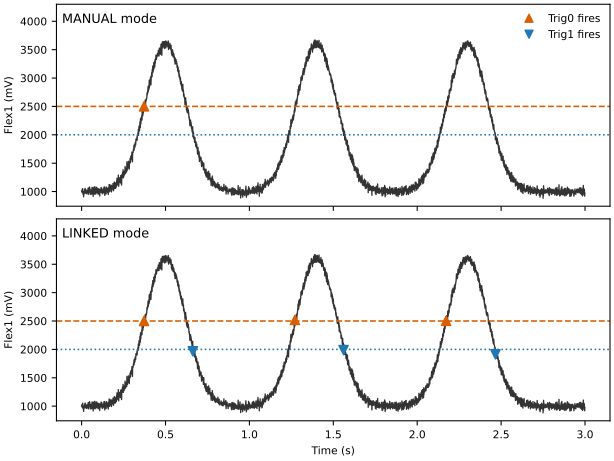
Fig. 21 A signal on Flex1 with a rising threshold at 2.5 V (Trig0) and a
falling threshold at 2 V (Trig1); only Trig0 is enabled at the start.#
You set up thresholds through the channel's
thresholds. They start out disabled, so a
threshold that should work from the start of a trial also needs to be enabled.
In this example, a lever with a force sensor is connected to Flex1. Its signal
rises when the subject presses the lever, so Flex1 gets a rising threshold at
2.5 V, and the state machine waits for its event to give a reward:

Fig. 23 A lever press, detected by Flex1's first threshold, opens the valve.#

Fig. 24 A lever press, detected by Flex1's first threshold, opens the valve.#
 1from bpod_core.bpod import Bpod
 2from bpod_core.bpod.constants import FlexIOChannelType, FlexIOThresholdPolarity
 3from bpod_core.fsm import StateMachine
 4
 5fsm = StateMachine()
 6fsm.add_state(
 7    name='WaitForPress',
 8    timer=10,
 9    transitions={'Flex1_Trig0': 'Reward', 'Tup': '>exit'},
10)
11fsm.add_state(
12    name='Reward',
13    timer=0.1,
14    transitions={'Tup': '>exit'},
15    actions={'Valve1': 1},
16)
17
18with Bpod() as bpod:
19    force_sensor = bpod.flex_io['Flex1']
20    force_sensor.channel_type = FlexIOChannelType.ANALOG_INPUT
21    force_sensor.thresholds[0].voltage = 2500  # mV
22    force_sensor.thresholds[0].polarity = FlexIOThresholdPolarity.RISING
23    force_sensor.thresholds[0].enabled = True
24    bpod.run(fsm)
25
26data = bpod.get_data()
Trial data of the lever-press example
>>> data
shape: (11, 8)
┌────────────────────────────────┬───────┬──────────────────┬──────────────┬─────────────────┬─────────────┬─────────┬───────┐
│ Time                           ┆ Trial ┆ State Machine    ┆ State        ┆ Type            ┆ Event       ┆ Channel ┆ Value │
│ ---                            ┆ ---   ┆ ---              ┆ ---          ┆ ---             ┆ ---         ┆ ---     ┆ ---   │
│ datetime[μs, UTC]              ┆ u32   ┆ cat              ┆ cat          ┆ enum            ┆ cat         ┆ cat     ┆ u16   │
╞════════════════════════════════╪═══════╪══════════════════╪══════════════╪═════════════════╪═════════════╪═════════╪═══════╡
│ 2026-10-22 14:41:33.213841 UTC ┆ 0     ┆ 56b7e20aca4f280e ┆ null         ┆ TrialStart      ┆ null        ┆ null    ┆ null  │
│ 2026-10-22 14:41:33.213841 UTC ┆ 0     ┆ 56b7e20aca4f280e ┆ WaitForPress ┆ StateStart      ┆ null        ┆ null    ┆ null  │
│ 2026-10-22 14:41:34.513941 UTC ┆ 0     ┆ 56b7e20aca4f280e ┆ WaitForPress ┆ InputEvent      ┆ Flex1_Trig0 ┆ Flex1   ┆ 2500  │
│ 2026-10-22 14:41:34.513941 UTC ┆ 0     ┆ 56b7e20aca4f280e ┆ WaitForPress ┆ StateEnd        ┆ null        ┆ null    ┆ null  │
│ 2026-10-22 14:41:34.513941 UTC ┆ 0     ┆ 56b7e20aca4f280e ┆ Reward       ┆ StateStart      ┆ null        ┆ null    ┆ null  │
│ 2026-10-22 14:41:34.513941 UTC ┆ 0     ┆ 56b7e20aca4f280e ┆ Reward       ┆ OutputAction    ┆ null        ┆ Valve1  ┆ 1     │
│ 2026-10-22 14:41:34.613941 UTC ┆ 0     ┆ 56b7e20aca4f280e ┆ Reward       ┆ InputEvent      ┆ Tup         ┆ null    ┆ null  │
│ 2026-10-22 14:41:34.613941 UTC ┆ 0     ┆ 56b7e20aca4f280e ┆ Reward       ┆ StateEnd        ┆ null        ┆ null    ┆ null  │
│ 2026-10-22 14:41:34.613941 UTC ┆ 0     ┆ 56b7e20aca4f280e ┆ null         ┆ OutputAction    ┆ null        ┆ Valve1  ┆ 0     │
│ 2026-10-22 14:41:34.613941 UTC ┆ 0     ┆ 56b7e20aca4f280e ┆ null         ┆ TrialEnd        ┆ null        ┆ null    ┆ null  │
│ 2026-10-22 14:41:34.613959 UTC ┆ 0     ┆ 56b7e20aca4f280e ┆ null         ┆ TrialEndControl ┆ null        ┆ null    ┆ null  │
└────────────────────────────────┴───────┴──────────────────┴──────────────┴─────────────────┴─────────────┴─────────┴───────┘
The press is recorded as a Flex1_Trig0 event, which ends WaitForPress and
starts Reward. Its value is the threshold's voltage in millivolts.
Enabling and Disabling Thresholds
A state can also enable or disable thresholds while a trial runs, with the
AnalogThreshEnable and AnalogThreshDisable actions. Both act on the two
thresholds of every channel you choose. To choose channels, add up their values:
Channel |
|
|
|
|
|---|---|---|---|---|
Value |
1 |
2 |
4 |
8 |
For example, {'AnalogThreshEnable': 1 + 4} enables the thresholds of Flex1 and
Flex3. This is binary encoding with one bit per channel (Flex1 is the lowest),
so 0b0101 works as well.
In this example, presses only count after a 2-second delay. The threshold is set up as before, but left disabled: the state machine enables it.

Fig. 25 Flex1's thresholds are enabled when WaitForPress begins.#

Fig. 26 Flex1's thresholds are enabled when WaitForPress begins.#
 1from bpod_core.bpod import Bpod
 2from bpod_core.bpod.constants import FlexIOChannelType, FlexIOThresholdPolarity
 3from bpod_core.fsm import StateMachine
 4
 5fsm = StateMachine()
 6fsm.add_state(
 7    name='Delay',
 8    timer=2,
 9    transitions={'Tup': 'WaitForPress'},
10)
11fsm.add_state(
12    name='WaitForPress',
13    timer=10,
14    transitions={'Flex1_Trig0': 'Reward', 'Tup': '>exit'},
15    actions={'AnalogThreshEnable': 1},
16)
17fsm.add_state(
18    name='Reward',
19    timer=0.1,
20    transitions={'Tup': '>exit'},
21    actions={'Valve1': 1},
22)
23
24with Bpod() as bpod:
25    force_sensor = bpod.flex_io['Flex1']
26    force_sensor.channel_type = FlexIOChannelType.ANALOG_INPUT
27    force_sensor.thresholds[0].voltage = 2500  # mV
28    force_sensor.thresholds[0].polarity = FlexIOThresholdPolarity.RISING
29    bpod.run(fsm)
30
31data = bpod.get_data()
Trial data of the delayed-enable example
>>> data
shape: (15, 8)
┌────────────────────────────────┬───────┬──────────────────┬──────────────┬─────────────────┬─────────────┬────────────────────┬───────┐
│ Time                           ┆ Trial ┆ State Machine    ┆ State        ┆ Type            ┆ Event       ┆ Channel            ┆ Value │
│ ---                            ┆ ---   ┆ ---              ┆ ---          ┆ ---             ┆ ---         ┆ ---                ┆ ---   │
│ datetime[μs, UTC]              ┆ u32   ┆ cat              ┆ cat          ┆ enum            ┆ cat         ┆ cat                ┆ u16   │
╞════════════════════════════════╪═══════╪══════════════════╪══════════════╪═════════════════╪═════════════╪════════════════════╪═══════╡
│ 2026-10-22 13:50:27.805215 UTC ┆ 0     ┆ 51ca9d9ab0f63fda ┆ null         ┆ TrialStart      ┆ null        ┆ null               ┆ null  │
│ 2026-10-22 13:50:27.805215 UTC ┆ 0     ┆ 51ca9d9ab0f63fda ┆ Delay        ┆ StateStart      ┆ null        ┆ null               ┆ null  │
│ 2026-10-22 13:50:29.805215 UTC ┆ 0     ┆ 51ca9d9ab0f63fda ┆ Delay        ┆ InputEvent      ┆ Tup         ┆ null               ┆ null  │
│ 2026-10-22 13:50:29.805215 UTC ┆ 0     ┆ 51ca9d9ab0f63fda ┆ Delay        ┆ StateEnd        ┆ null        ┆ null               ┆ null  │
│ 2026-10-22 13:50:29.805215 UTC ┆ 0     ┆ 51ca9d9ab0f63fda ┆ WaitForPress ┆ StateStart      ┆ null        ┆ null               ┆ null  │
│ 2026-10-22 13:50:29.805215 UTC ┆ 0     ┆ 51ca9d9ab0f63fda ┆ WaitForPress ┆ OutputAction    ┆ null        ┆ AnalogThreshEnable ┆ 1     │
│ 2026-10-22 13:50:30.805315 UTC ┆ 0     ┆ 51ca9d9ab0f63fda ┆ WaitForPress ┆ InputEvent      ┆ Flex1_Trig0 ┆ Flex1              ┆ 2500  │
│ 2026-10-22 13:50:30.805315 UTC ┆ 0     ┆ 51ca9d9ab0f63fda ┆ WaitForPress ┆ StateEnd        ┆ null        ┆ null               ┆ null  │
│ 2026-10-22 13:50:30.805315 UTC ┆ 0     ┆ 51ca9d9ab0f63fda ┆ Reward       ┆ StateStart      ┆ null        ┆ null               ┆ null  │
│ 2026-10-22 13:50:30.805315 UTC ┆ 0     ┆ 51ca9d9ab0f63fda ┆ Reward       ┆ OutputAction    ┆ null        ┆ Valve1             ┆ 1     │
│ 2026-10-22 13:50:30.905315 UTC ┆ 0     ┆ 51ca9d9ab0f63fda ┆ Reward       ┆ InputEvent      ┆ Tup         ┆ null               ┆ null  │
│ 2026-10-22 13:50:30.905315 UTC ┆ 0     ┆ 51ca9d9ab0f63fda ┆ Reward       ┆ StateEnd        ┆ null        ┆ null               ┆ null  │
│ 2026-10-22 13:50:30.905315 UTC ┆ 0     ┆ 51ca9d9ab0f63fda ┆ null         ┆ OutputAction    ┆ null        ┆ Valve1             ┆ 0     │
│ 2026-10-22 13:50:30.905315 UTC ┆ 0     ┆ 51ca9d9ab0f63fda ┆ null         ┆ TrialEnd        ┆ null        ┆ null               ┆ null  │
│ 2026-10-22 13:50:30.905333 UTC ┆ 0     ┆ 51ca9d9ab0f63fda ┆ null         ┆ TrialEndControl ┆ null        ┆ null               ┆ null  │
└────────────────────────────────┴───────┴──────────────────┴──────────────┴─────────────────┴─────────────┴────────────────────┴───────┘
AnalogThreshEnable shows up as an output action when WaitForPress begins,
followed by the press's Flex1_Trig0 event. An earlier press during Delay left
no trace: the threshold wasn't enabled yet.